


FLOWER SHOP
FLOWER SHOP
A responsive website.
THE PROBLEM
Users often struggle to visit the flower shop due to time constraints and lack clear information about which flowers are best suited for their needs.
THE SOLUTION
A website that allows users to place orders in advance, schedule deliveries, and access helpful information or advice. This platform helps users save both time and money by providing a convenient and informative shopping experience.
PROJECT YEAR
June, 2022


Design Thinking Process

Empathize

Define

Ideate

Prototype

Test
ICONS Flaticon: Smashicon, Freepik, Gowi, Iconixar
EMPATHIZE
Understanding the User
Research offers valuable insights by collecting real data from actual users, which helps shape the development of effective solutions. Interviews were conducted with users aged 18 to 70, who regularly purchase flowers for various purposes.
.png)
Pain points
1
Time
Users mentioned a lack of time to visit the flower shop, especially since their preferred store is not nearby, requiring extra time to get there.
2
Lack of information
Users expressed limited knowledge about flowers and would appreciate assistance to make more informed purchasing decisions.
3
Budget
Users want to customize their own bouquets but are concerned about staying within their budget.
Personas
Problem statement:
Laura is a busy professional, who needs to buy her flower gift in advance, because she works and is not able to arrive early to the store to find fresh flowers.

User Journey Map
This helps visualize the path users take to complete a task, highlighting their pain points and emotions. It also reveals design opportunities to address their needs and improve their experience.

DEFINE
Information Aechitecture
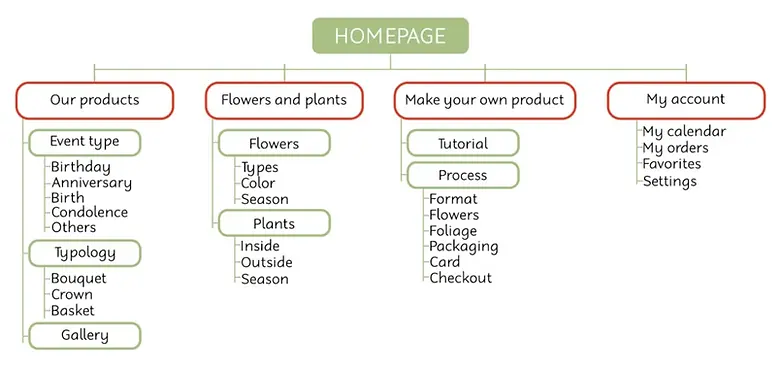
Digital Wireframes


Usability Study: Parameters

Study type
Unmoderated usability study

Location
Spain, remote

Participants
5 participants

Lenght
15-20 minutes
ICONS Flaticon: Iconixar
Usability Study: Findings
1
User Flow
Users found some tasks difficult and felt lost regarding the flow to reach the objective.
2
Page Overview
A menu on the homepage would make it easier to navigate and increase visibility of different sections.
3
Task Flow
Buttons that guide the user through the tasks would make the flow more intuitive.

Accessibility Considerations
1
Headings
Page headers should be added to provide structure and aid users who rely on screen readers. This will create a clear hierarchy and improve navigation across the site.
2
Annotations
Markers will be included within the interface to guide the screen reader and ensure smooth navigation.
3
Labels
Descriptive language should be added above interface elements, along with detailed annotations for developers to ensure clarity and accessibility.
FINAL PRODUCT

Ready to elevate your brand?
Get in touch and let’s create something great.
Catalonia, Spain
Follow me